
Search doesn’t look the way it used to. Type a question into Google today, and there’s a good chance you’ll be handed something closer to a conversation than a list of blue links. That shift has a name artificial intelligence mode, or simply AI Mode and it’s quietly changing how billions of people find information.
If you’ve noticed longer, more detailed answers appearing in Google, or you’ve heard marketers talking anxiously about “losing clicks to AI Mode,” this guide untangles what’s actually happening. We’ll cover how it works under the hood, how it’s different from the AI Overviews you may already be familiar with, and what it means for anyone who publishes content online.
Artificial Intelligence Mode Explained in Plain Terms
At its core, artificial intelligence mode is a search experience built on Google’s Gemini models that lets you ask complex, multi-part questions and get back a synthesized, reasoned response instead of a page of links to click through. Rather than matching keywords to indexed pages, it breaks a question into pieces, researches each piece, and stitches the findings into one coherent answer.
The easiest way to think about it: traditional search hands you a map and lets you find your own way. AI Mode tries to walk the route with you, answering the follow-up questions you’d naturally have along the way, without forcing you to start a brand-new search each time.
How Artificial Intelligence Mode Actually Processes a Query
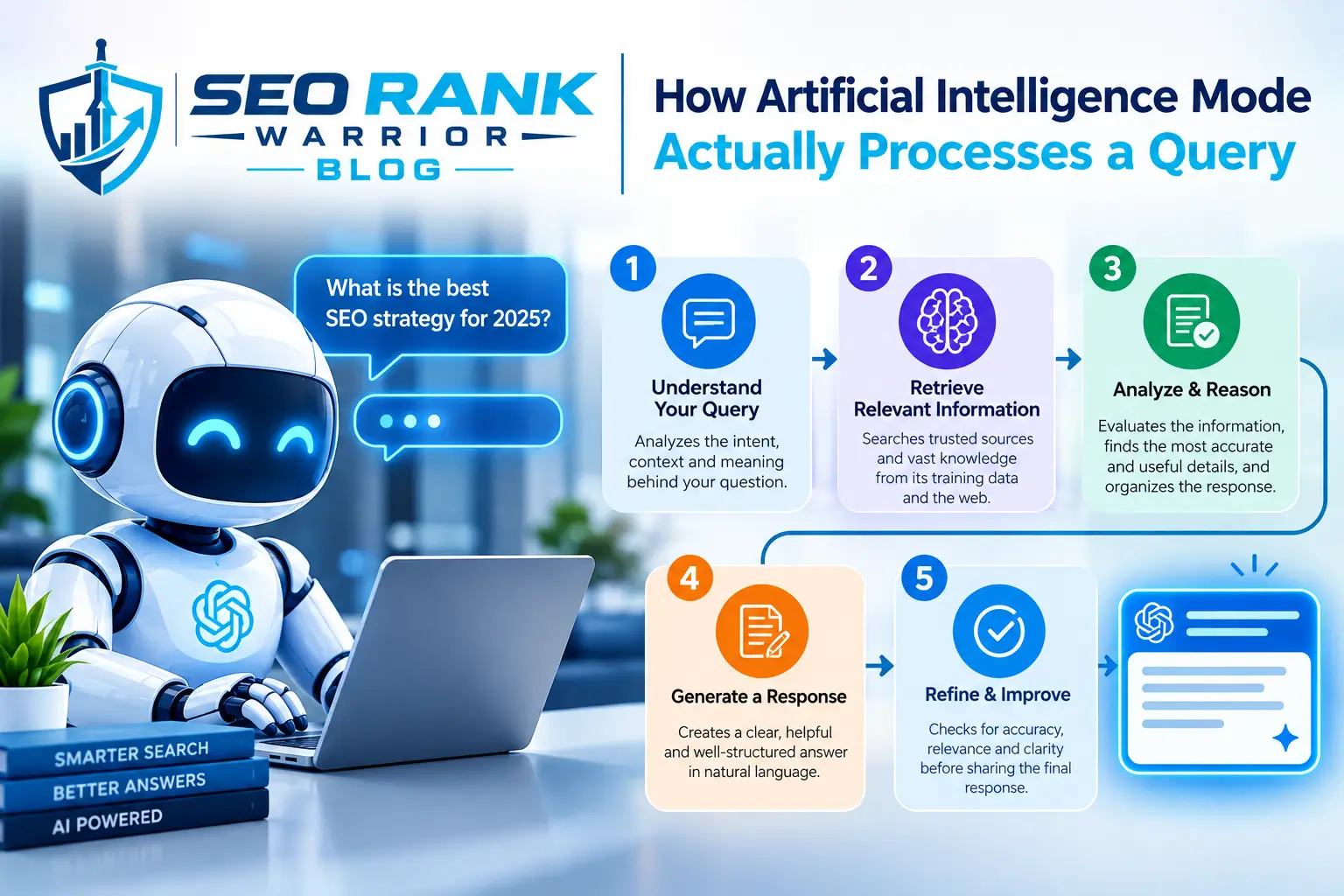
Under the surface, this isn’t a single model spitting out a paragraph. It’s a small research pipeline that runs in seconds.
Query Fan-Out and Reasoning
When you submit a question, the system doesn’t just search for that exact phrase. It generates a range of related sub-queries covering different angles of your question, runs them simultaneously, and then reasons across everything it finds to decide what’s actually relevant. This “fan-out” approach is part of why AI Mode responses tend to feel more thorough than a typical AI Overview there’s simply more retrieval happening behind the scenes.
Multimodal Inputs
Text isn’t the only thing you can feed it. AI Mode accepts images, uploaded files, and voice, and increasingly can pull in context from open browser tabs. Ask a question about a photo you’ve taken, and it can reason over the visual content alongside whatever you typed. This multimodal layer is what allows AI Mode to handle open-ended, exploratory questions that a plain text search engine was never built to answer.
AI Mode vs AI Overviews: Where the Line Sits
People often use these two terms interchangeably, but they aren’t the same feature.
AI Overviews are the short, AI-generated summaries that appear above traditional search results for many everyday queries a quick answer you can skim before deciding whether to dig deeper. AI Mode, by contrast, is a dedicated, conversational surface. You go into it intentionally (or get routed there for a complex query), and it supports ongoing back-and-forth dialogue, remembering the context of your previous questions within that session.
Google has also started blending the two: a follow-up question typed after an AI Overview can now flow directly into AI Mode with the original context carried over, so the boundary between “quick summary” and “full conversation” is becoming less rigid than it once was.
Timeline: From Labs Experiment to Mainstream Feature
Artificial intelligence mode didn’t appear overnight. It began as a limited Search Labs experiment in the US in March 2025, running on an early Gemini model and available only to opted-in testers.
From there, growth was fast:
- Google upgraded the underlying model and pulled AI Mode out of the experimental Labs tier, making it available more broadly.
- A later model transition brought longer, more coherent responses and the ability to handle more complex, multi-step tasks.
- Rollout expanded market by market, eventually reaching several hundred countries and close to 100 languages, at no subscription cost.
- Google has reported the feature crossing one billion monthly users, with the volume of queries roughly doubling every few months since launch.
That trajectory from a niche test to a globally available default feature in a little over a year says a lot about how seriously Google is treating conversational search as the future of the product.
What You Can Actually Do Inside AI Mode
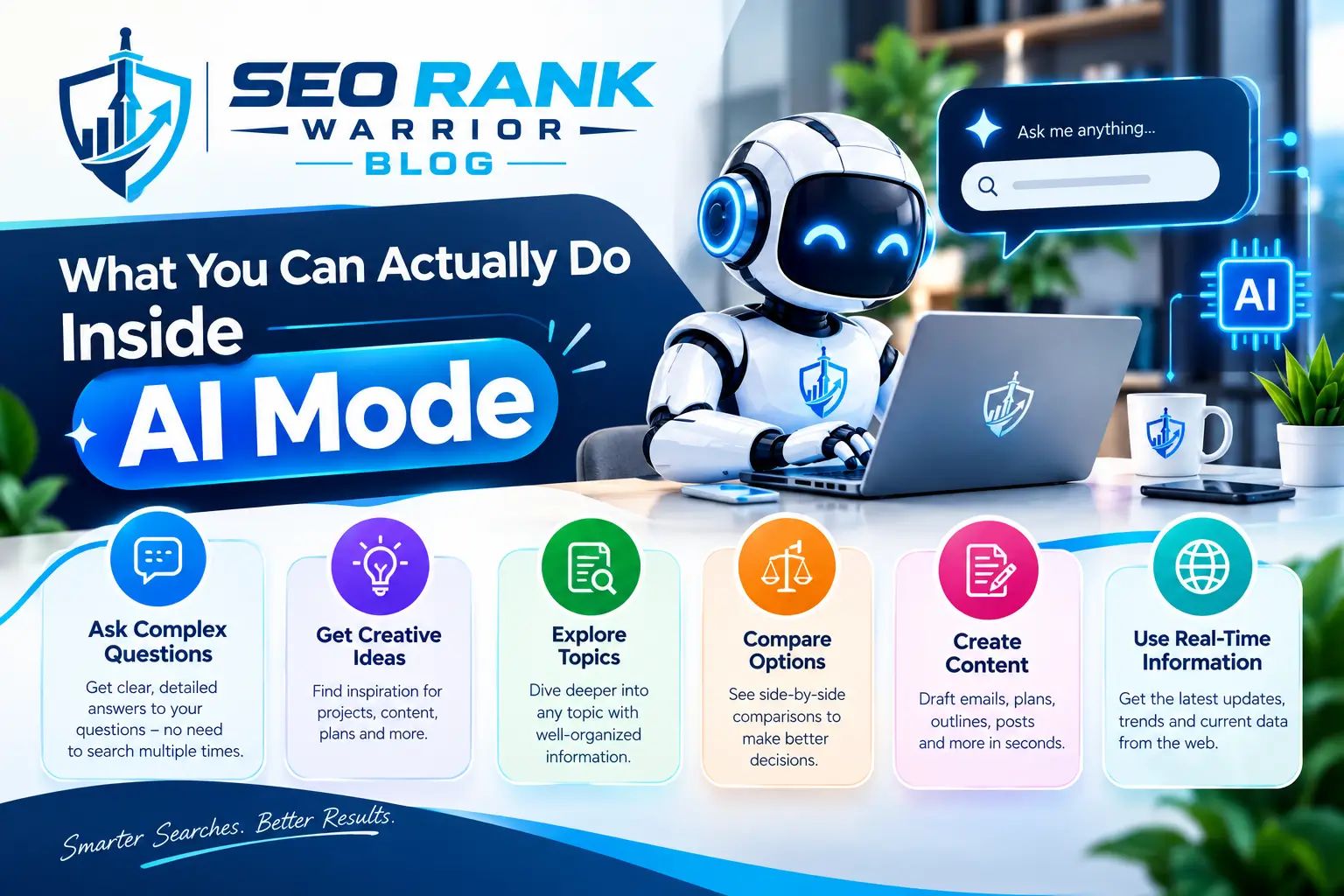
The feature has moved well past simple question-answering.
Conversational Follow-Ups
You can ask an initial question, then keep refining it “what about for a smaller budget,” “does that still apply outside the US” — without restarting the search each time. The system holds onto context from earlier in the thread, similar to chatting with an assistant rather than repeatedly querying a search bar.
Agentic Actions and Real-World Tasks
More recently, AI Mode has taken on tasks that go beyond answering questions. It can help track flight prices, surface hotel options, and assemble day-by-day trip itineraries by pulling together information from Search, Maps, and reviews into a single editable plan. It’s also being extended toward taking actions on a user’s behalf, such as contacting a business, rather than just describing what to do next.
Where Artificial Intelligence Mode Is Available Right Now
Availability has expanded rapidly, though rollout hasn’t been perfectly uniform. Major Western markets came online at different points throughout 2025 and 2026, with some regions including parts of the EU arriving later due to regulatory review. Access generally depends on your actual physical location at the time you search, not the country tied to your account, so results can shift if you’re traveling.
If you don’t see it yet, it’s worth checking directly rather than assuming it isn’t available in your country the feature has been rolling out to new markets on a near-continuous basis.
What This Shift Means for Website Owners and Marketers

For anyone who depends on search traffic as part of their broader SEO strategy, AI Mode changes the calculation in a few concrete ways.
Early data from marketers testing shopping-related queries found that AI Mode surfaces a dramatically smaller set of results than a standard search often showing a fraction of the product listings you’d see on a normal results page, with very little overlap between the two. That means visibility inside AI Mode can’t be assumed just because a page ranks well in traditional search; it’s a separate battle for attention.
At the same time, tools like Search Console are adapting to track this new surface, treating each follow-up question in a conversation as its own trackable query. That gives publishers a rough way to measure exposure, even if AI Mode itself sends far fewer direct clicks back to any single website compared to a traditional results page.
The practical takeaway for content creators: writing for AI Mode means being the source that gets pulled into an answer, not necessarily the page someone clicks through to. That shifts the priority toward being clearly structured, factually precise, and easy for an AI system to extract and cite.
Getting Started with Artificial Intelligence Mode
Trying it out is simple. On most devices, you’ll find an “AI Mode” tab alongside the usual “All,” “Images,” and “Videos” filters at the top of Google Search results, or a dedicated icon in the Google app. Tap into it, ask a question the way you’d ask a person, and follow up naturally there’s no special syntax required.
FAQs – Artificial Intelligence Mode
Is artificial intelligence mode the same as AI Overviews?
No. AI Overviews are short summaries shown above regular search results for many queries. AI Mode is a separate, dedicated conversational experience designed for deeper, multi-turn interactions.
Do I need a subscription to use AI Mode?
No. Google has made the core AI Mode experience free and available without a paid plan, though certain advanced features have at times launched first for paid subscribers before rolling out more broadly.
Which AI model powers AI Mode?
AI Mode runs on Google’s Gemini family of models. The specific version has changed over time as Google has upgraded the system to improve reasoning, response length, and support for more complex tasks.
Does AI Mode replace regular Google Search?
Not currently. Google has stated it is not the default search experience. It exists alongside traditional search results as an option for people who want a more conversational, in-depth answer.
How does AI Mode affect website traffic?
Because AI Mode answers many questions directly within the conversation, it can reduce the need to click through to individual websites, particularly for straightforward informational and product-comparison queries. Sites that are clearly structured and easy to cite tend to fare better at being included in its answers.
Conclusion
Artificial intelligence mode represents one of the biggest shifts in how Google Search behaves since the company introduced instant results over a decade ago. It trades the familiar list of links for something closer to a knowledgeable assistant that can reason, follow up, and even take action. For everyday users, that means faster, more complete answers to complicated questions. For businesses and content creators, it means rethinking what “ranking well” even means in a search experience that increasingly answers questions itself rather than pointing elsewhere. Understanding how it works today is the first step toward staying visible as it keeps evolving.