
MBAM software is a Microsoft solution designed to help organizations manage and monitor BitLocker Drive Encryption across Windows devices. It was created to make enterprise encryption easier to deploy, manage, monitor, and support from a centralized environment.
MBAM is particularly associated with BitLocker policy management, encryption compliance, recovery-key management, reporting, and help-desk operations. However, its role has changed over time. Microsoft has incorporated MBAM Software functionality into Configuration Manager BitLocker Management, while organizations using modern cloud-based management can use Microsoft Intune and Microsoft Entra ID capabilities for BitLocker administration.
What Is MBAM Software?
MBAM stands for Microsoft BitLocker Administration and Monitoring.
It is an enterprise management solution built around BitLocker Drive Encryption, Microsoft’s Windows encryption technology. BitLocker protects data stored on Windows devices by encrypting the operating system drive and supported data drives.
MBAM adds centralized management capabilities around BitLocker. Instead of requiring administrators to manually configure and monitor encryption on individual computers, organizations could use MBAM to apply policies, monitor compliance, manage recovery information, and generate reports.
Microsoft describes MBAM 2.5 as a solution that can enforce enterprise BitLocker policies, monitor client compliance, report encryption status, and provide access to recovery-key information when users need to recover encrypted devices.
This makes MBAM especially relevant to organizations that need to protect sensitive information stored on laptops, desktops, and other Windows endpoints.
How Does Microsoft MBAM Work?
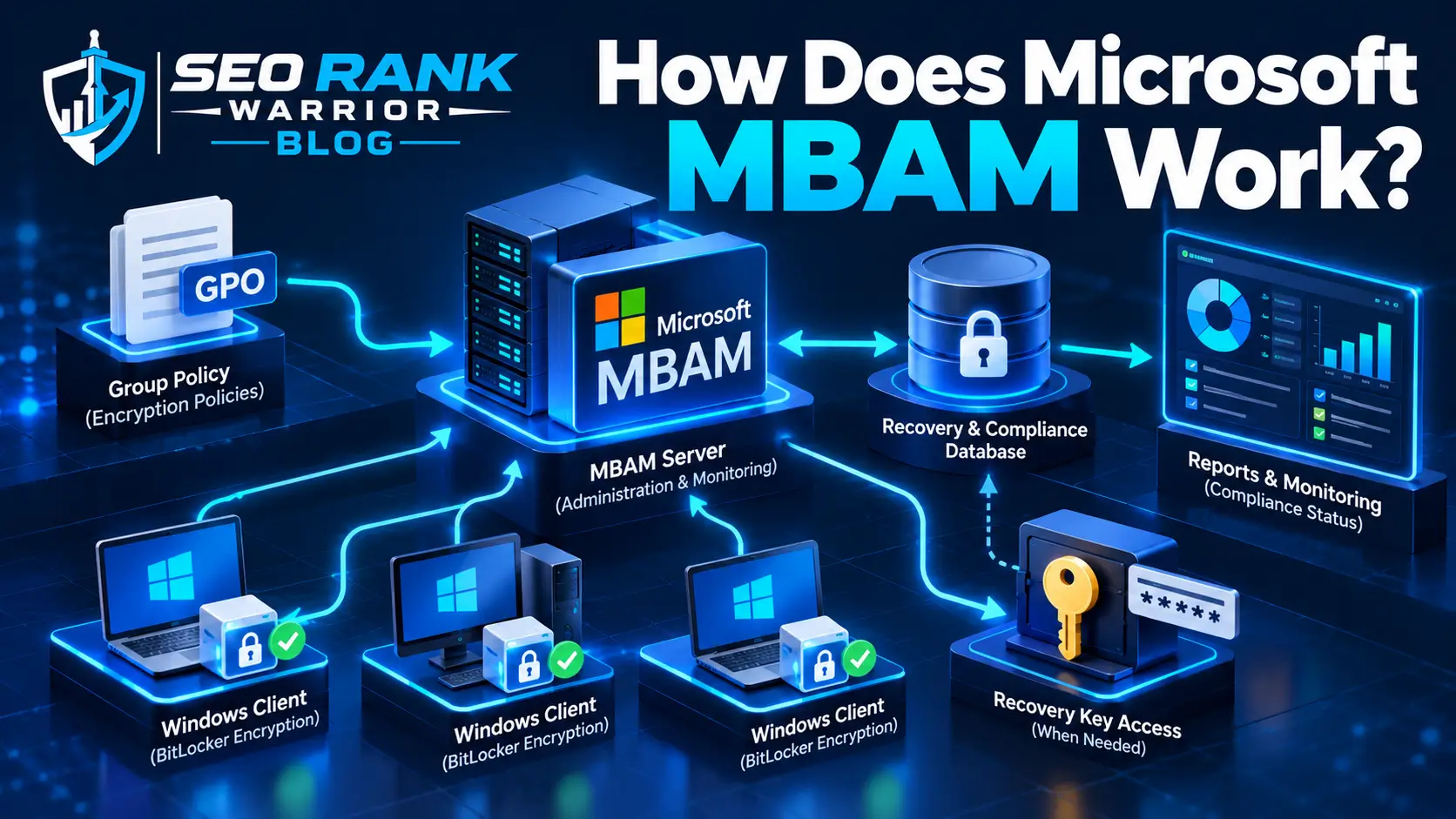
MBAM works alongside BitLocker rather than replacing it.
BitLocker performs the actual drive encryption. MBAM provides management and monitoring capabilities that help an organization control and support BitLocker across its devices.
A typical MBAM environment could include:
- MBAM client
- Group Policy
- Administration and Monitoring Server
- Recovery database
- Compliance and audit database
- Self-Service Portal
- Administration and Monitoring website
- Reporting components
Administrators could configure BitLocker-related policies through the organization’s management environment. The MBAM client would then apply and report the relevant encryption state.
MBAM could also collect information required for recovery and compliance monitoring, allowing security and IT teams to determine whether devices were properly protected.
Key Features of MBAM Software
BitLocker Policy Management
One of the main purposes of MBAM was to help organizations establish and enforce BitLocker policies.
Administrators could define requirements for encryption and use Group Policy to apply appropriate settings to managed computers.
This made it easier to create a consistent encryption standard rather than managing individual computers manually.
Encryption Compliance Monitoring
MBAM could show whether individual computers and the wider organization were compliant with their BitLocker policies.
This was particularly useful for security teams because encryption compliance is difficult to manage effectively when hundreds or thousands of devices are involved.
Microsoft documentation identifies enterprise compliance and computer compliance reporting as key MBAM capabilities.
Recovery Key Management
BitLocker recovery keys are essential when an encrypted computer enters recovery mode.
For example, a device may require recovery after certain changes to the BIOS, startup configuration, or TPM state. A user may also lose their normal PIN or password.
MBAM provided centralized access to recovery information so authorized support personnel could help users regain access to encrypted devices.
Self-Service Recovery
MBAM could also reduce help-desk workload by allowing users to recover their encrypted devices through a self-service portal.
Instead of requiring an administrator to manually handle every recovery request, eligible users could access recovery information through the organization’s configured recovery system.
Reporting
Reporting was another important part of MBAM.
Organizations could use reports to understand:
- Which computers were encrypted
- Which devices were compliant
- Which devices were not compliant
- BitLocker usage
- Recovery activity
- Individual computer status
This helped security and compliance teams identify devices that required attention.
What Is MBAM Used For?
The primary purpose of MBAM is centralized BitLocker management in an enterprise environment.
Organizations could use it to:
- Deploy and manage BitLocker policies
- Monitor encryption status
- Check device compliance
- Store and retrieve recovery information
- Support users during BitLocker recovery
- Reduce manual help-desk work
- Produce compliance reports
- Audit recovery-key access
- Improve control over Windows device encryption
For organizations managing large numbers of Windows devices, centralized management can be considerably more practical than handling encryption individually.
MBAM was therefore particularly useful for IT administrators, security teams, and compliance professionals responsible for protecting corporate data on endpoint devices.
MBAM Architecture and Components
Understanding the main components makes the software easier to understand.
MBAM Client
The MBAM client operates on managed Windows computers. It communicates information about the device’s BitLocker state and helps enforce the organization’s configured policies.
Administration and Monitoring Server
This component provides the administrative side of the MBAM environment.
Administrators can use the associated management interfaces to perform tasks such as checking compliance and assisting with recovery.
Recovery Database
The recovery database stores information required to support BitLocker recovery.
This allows authorized administrators to retrieve the appropriate recovery information when a device enters recovery mode.
Compliance and Audit Database
Compliance information can be used for reporting and monitoring.
It helps organizations understand the encryption state of their managed computers and investigate recovery-related activity.
Self-Service Portal
The self-service portal allows users to retrieve recovery information themselves when the organization’s policies and configuration permit it.
Administration and Monitoring Website
The administration and monitoring website provides an interface for support and administrative tasks.
Microsoft’s documentation describes this interface as a place where administrators can review reports, recover users’ drives, and manage TPM-related tasks.
MBAM and BitLocker: What’s the Difference?
MBAM and BitLocker are related, but they are not the same thing.
| Feature | BitLocker | MBAM |
| Main purpose | Encrypt data | Manage and monitor BitLocker |
| Drive encryption | Yes | Uses BitLocker |
| Centralized policy management | Limited by itself | Yes |
| Compliance monitoring | Limited | Yes |
| Recovery management | Provides recovery mechanism | Centralizes recovery support |
| Enterprise reporting | Limited | Yes |
| Help-desk recovery | Basic Windows functionality | Dedicated management capabilities |
The simplest way to remember the difference is:
BitLocker protects the data. MBAM manages the enterprise BitLocker experience.
Microsoft describes MBAM as a management solution that simplifies administration of BitLocker and provides policy, compliance, reporting, and recovery capabilities.
What Does the MBAM Client Do?
The MBAM client is installed on managed computers and participates in the organization’s BitLocker management process.
Its responsibilities can include communicating the device’s encryption state, applying relevant policies, and providing information needed for centralized monitoring.
This makes the client an important link between an individual Windows computer and the organization’s broader BitLocker management environment.
However, organizations should distinguish older standalone MBAM deployments from the newer BitLocker Management capabilities available through Microsoft Configuration Manager.
Microsoft specifically warns that the old MBAM deployment approach should not be used with current Configuration Manager BitLocker Management in unsupported configurations.
MBAM Recovery Key Management
Recovery-key management is one of the most important reasons organizations used MBAM.
A BitLocker-protected computer can enter recovery mode for different reasons. These may include:
- A forgotten PIN
- A lost startup key
- Changes to BIOS settings
- Changes to startup files
- TPM-related events
- Other changes detected by BitLocker
An authorized administrator can use the recovery system to locate the appropriate recovery information and help the user unlock the device.
Microsoft’s current BitLocker administration documentation explains that the administration and monitoring interface can be used to retrieve recovery information based on the recovery key ID.
Because recovery keys can provide access to encrypted data, organizations should protect them carefully and restrict recovery access to authorized personnel.
MBAM Compliance Monitoring and Reporting
Security teams need more than encryption itself. They also need to know whether devices are actually following organizational policies.
MBAM addressed this requirement through compliance monitoring and reporting.
Reports could provide information about:
- Enterprise encryption compliance
- Individual computer compliance
- Encryption status
- Recovery activity
- Audit information
Microsoft’s MBAM documentation identifies enterprise compliance, computer compliance, and recovery audit reports as important reporting categories.
This information can help security teams identify devices that have not reached the required encryption state.
Is Microsoft MBAM Still Supported in 2026?
This is one of the most important questions for anyone researching MBAM software today.
Microsoft’s current documentation states that extended support for the Microsoft Desktop Optimization Pack (MDOP) ends on April 14, 2026. Microsoft also states that MBAM functionality has been incorporated into Microsoft Configuration Manager as Configuration Manager BitLocker Management.
Therefore, organizations should not treat legacy MBAM as the preferred long-term solution for a new deployment.
For organizations already using older MBAM infrastructure, the important question is how to move toward Microsoft’s supported BitLocker management options.
Microsoft Configuration Manager provides BitLocker lifecycle management that can replace MBAM for supported on-premises Windows environments.
Organizations that do not use Configuration Manager can use Microsoft Intune and Microsoft Entra ID capabilities for BitLocker administration and monitoring.
MBAM vs Modern BitLocker Management
Modern Microsoft environments have several options for managing BitLocker.
Legacy MBAM
Legacy MBAM was designed specifically around centralized enterprise BitLocker administration, compliance monitoring, recovery, and reporting.
It remains important historically and for organizations maintaining existing deployments, but it is no longer the direction Microsoft recommends for new environments.
Configuration Manager BitLocker Management
Configuration Manager includes BitLocker management capabilities that provide policy management, recovery-key escrow, compliance reporting, and administrative support.
Microsoft specifically states that Configuration Manager BitLocker Management can replace MBAM.
Microsoft Intune
For cloud-managed Windows devices, Intune provides modern policy and device-management capabilities.
Organizations using cloud-based endpoint management can use Intune to manage Windows encryption policies and integrate recovery-key management into Microsoft’s broader device-management ecosystem.
Microsoft Entra ID
Microsoft Entra ID can also be part of a modern cloud-based identity and device-management strategy, including scenarios where BitLocker recovery information is managed through Microsoft’s cloud services.
The right option depends on the organization’s existing infrastructure, device-management strategy, and security requirements.
MBAM Software Installation and Deployment
Traditional MBAM deployment involved several infrastructure components and configuration steps.
Depending on the deployment model, organizations could need:
- Windows Server
- SQL Server
- Group Policy
- MBAM client
- Administration and Monitoring components
- Reporting services
- Recovery infrastructure
- Appropriate Active Directory permissions
The complexity depended on whether MBAM was deployed as a standalone solution or integrated with Configuration Manager.
For new deployments in 2026, however, organizations should first evaluate Microsoft’s current BitLocker management options rather than automatically installing legacy MBAM.
Microsoft’s documentation confirms that current Configuration Manager BitLocker Management has its own deployment and recovery architecture and should not be treated as an extension of old MBAM deployment scripts.
Common MBAM Problems and Troubleshooting
Organizations maintaining legacy MBAM environments may encounter several types of problems.
BitLocker Is Not Starting
Check the applied policies, client configuration, device status, and TPM availability.
Device Is Not Reporting Compliance
Verify that the client can communicate with the management infrastructure and that the expected policy has been applied.
Recovery Key Cannot Be Found.
Confirm that the correct recovery information was escrowed and search using the appropriate recovery key ID.
User Is Locked Out
Determine why BitLocker entered recovery mode before providing the appropriate authorized recovery process.
Reporting Is Not Updating
Check the MBAM reporting components, database connectivity, client communication, and relevant event logs.
Microsoft’s current BitLocker administration documentation also provides troubleshooting and recovery procedures for supported Configuration Manager environments.
MBAM Software Alternatives in 2026
For organizations evaluating MBAM today, the main consideration is not simply finding another third-party product. It is choosing a supported method of managing BitLocker.
The most relevant Microsoft options include:
Microsoft Configuration Manager BitLocker Management is appropriate for organizations using Configuration Manager and needing centralized management for supported Windows environments.
Microsoft Intune useful for organizations managing Windows devices through cloud-based endpoint management.
Microsoft Entra ID can support cloud identity and device-management scenarios involving BitLocker recovery information.
These approaches can provide modern management capabilities while reducing reliance on the legacy MBAM architecture.
FAQs – MBAM Software
What is MBAM software used for?
MBAM software was designed to manage and monitor BitLocker Drive Encryption across enterprise Windows devices. It provided policy management, compliance monitoring, recovery-key management, reporting, and administrative support.
Is MBAM the same as BitLocker?
No. BitLocker is the encryption technology that protects data on Windows drives. MBAM was a management and monitoring solution designed to help organizations administer BitLocker centrally.
Is Microsoft MBAM still supported in 2026?
Microsoft states that extended support for MDOP ends on April 14, 2026. Microsoft has incorporated MBAM functionality into Configuration Manager BitLocker Management and recommends modern management options for current environments.
What is the difference between MBAM and Intune?
MBAM is a legacy enterprise BitLocker management solution. Intune is Microsoft’s modern cloud-based endpoint management platform and can manage Windows encryption policies in supported environments.
Can MBAM manage BitLocker recovery keys?
Yes. Recovery-key management was one of MBAM’s important capabilities. It allowed authorized administrators to retrieve recovery information when users needed access to encrypted devices.
Conclusion
MBAM software, or Microsoft BitLocker Administration and Monitoring, was designed to make enterprise BitLocker management easier by providing centralized policy enforcement, compliance monitoring, recovery-key management, reporting, and administrative support.
Its importance comes from the fact that BitLocker itself provides encryption, while enterprise environments need additional tools to manage that encryption consistently across many devices.
However, the technology landscape has changed. Microsoft has incorporated MBAM functionality into Configuration Manager BitLocker Management, while organizations using cloud-based device management can use Intune and Microsoft Entra ID capabilities for modern BitLocker administration. Microsoft states that extended support for MDOP ends on April 14, 2026.
For organizations maintaining legacy MBAM installations, this makes migration planning especially important. For new deployments, evaluating Microsoft’s current BitLocker management options is generally more appropriate than building a new environment around legacy MBAM.